

Managing digital assets should be seamless and if a product can help users offering new features and better experience that to me makes a difference.
That’s why Sitecore’s latest update to the Content Hub Download Page is great for users. With the introduction of the unified download experience, the platform makes it easier, faster, and clearer to download assets.
What’s New
Previously, downloading assets in Sitecore Content Hub meant dealing with two different workflows – one for standard assets and one for restricted ones.
The experience was fragmented, especially in environments with large libraries and varied user permissions.
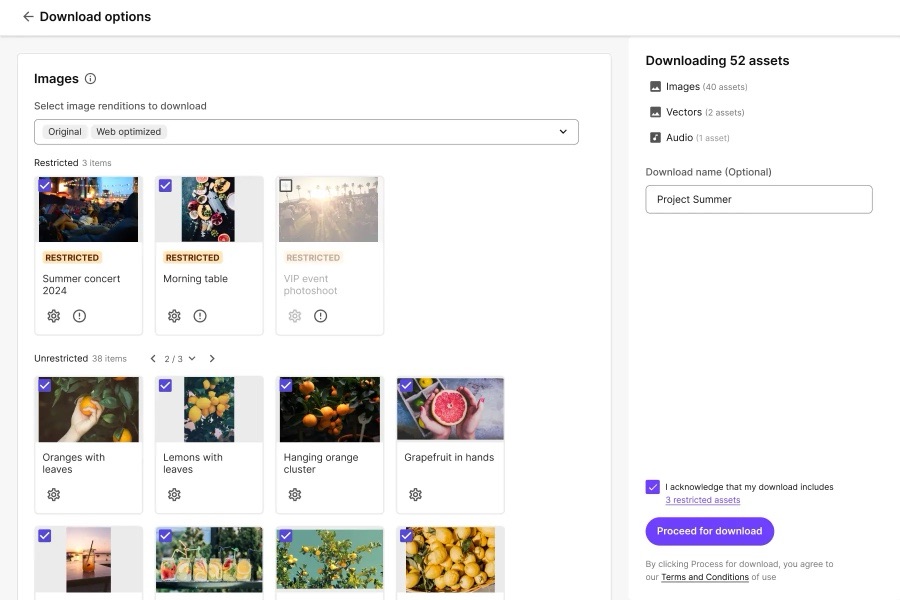
Now, Sitecore has released a unified download page that:
- Groups assets intuitively by media type and restriction level.
- Consolidates rendition choices in a clearer UI.
- Makes previewing and downloading multiple assets faster.
- Allows requesting access directly for restricted assets.
Note: This feature is currently in beta as of May 2025. You will for now need to enable it in your environment.

Key Features at a Glance
Grouped Downloads by Media Type and Access
When multiple assets are selected for download, they’re now organised by:
- Media type (e.g. images, documents, videos)
- Access level (standard vs restricted)
This makes it easy to understand what you’re downloading and how to manage access appropriately.
Example: If you select 15 assets – some images, some documents, some with restrictions – you’ll see them grouped into 3-4 categories with controls specific to each group.
Custom Renditions Made Easy
Need a specific format or size for campaign delivery? You can now:
- Select from preset renditions (Original, Medium, Metadata, etc.)
- Define custom renditions on the fly: Change file format (e.g. PNG, JPG, PDF)
- Resize with fixed dimensions or smart crop
- Convert color space (e.g. RGB, CMYK)
This flexibility removes the need for post-download editing in design tools.
Live Previews for Download Sets
Before finalising the download, users can preview asset renditions in real time. This ensures:
- The correct assets are selected
- Rendition settings look right
- Mistakes (like wrong format or low-res version) are caught early
Use Cases: Why It Matters
For Marketing & Campaign Teams
- Downloading localised assets in bulk for a regional launch
- Selecting web-optimised renditions with smart crop for social
For Compliance Teams
- Reviewing restricted content access before campaign release
- Ensuring downloads adhere to digital rights policies
For Agencies & Freelancers
- Pulling creative packages quickly for design projects
- Previewing all renditions without asking for help
My final thoughts
I love it when you find useful parts of a product. This to me is quite a simple ask but its delivery is very effective. Hopefully users start to test it and also feel it’s a good feature.
It’s great to see the Content Hub product are releasing useful features for users and looking forward to seeing what’s in the next release.


Leave a Reply