


Sitecore Content Hub is a really powerful solution for any organisation. If offers endless extension possibilities and when you build your own entities, a lot of flexibility.
I am currently the architect on a Content Hub solution for a global brand which required us to build our own entity. A page for editing this entity needed functionality to refresh a search component when an action was completed. The search component then shows the updated output following the processing of data on this entity.
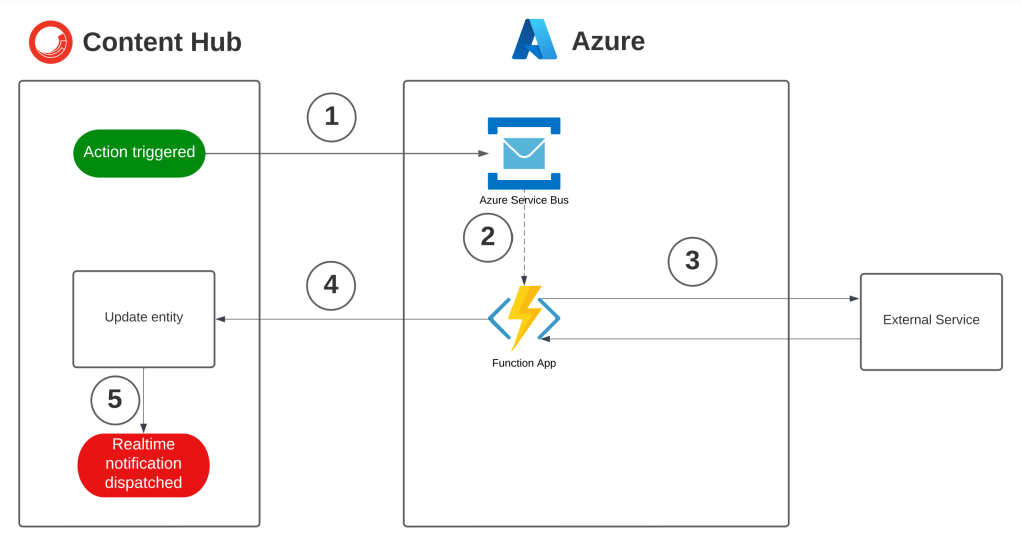
The action triggered an Azure Function which updated a property on the entity after some external processing. The Function uses the Content Hub SDK so when the save event is called triggers an update.

Flow breakdown here corresponding to numbers in image
- Action triggered that adds entry to Azure Service Bus
- Azure Function triggered on queue change
- External service triggered
- Response received and Content Hub SDK used to update entity
- Real-time notification sent to message subscribers
First attempt
The first version used a JavaScript interval to keep clicking the refresh button on the search component and updating the message displayed to the user.
$('#mExternalAction[title="Generate Preview"]').click(function () {
        stop = false;
        $('#message').remove();
        $('#messageBar').first().append(`<div class="alert alert-info" role="alert" id='message' style='color:rgba(0,0,0,0.62); margin-bottom:0;'>Starting Generation</div>`);
    });
setInterval(function() {
        if ($(".m-icon-image").length) {
            stop = false;
        }
        if (stop) {
            return;
        }
        try {
            if ($(".m-icon-image").length) {
                if (!generating) {
                    $('#message').remove();
                    $('#messageBar').first().append("Processing preview and download please wait");
                    generating = true;
                } else {
                    $('#search-refresh-button-wrapper-id-1 a').click();
                }
            } else if (generating) {
                generating = false;
                $('#message').remove();
                $('#messageBar').first().append("Processed successfully");
                generating = false;
            } else {
                $('#message').remove();
            }
        } catch (e) {
            console.log(e)
        }
    }, 2000);
This was not the best way to accomplish the task as the client code was executed every few seconds. Also the code keeps executing until the page is closed or navigated away from.
Better solution
We then decided to re factor the code and after some research found info on the realtime event subscription. The code can be seen below and it not only is less lines its only executed when the realtime event is triggered
$('#mExternalAction[title="Generate Advert Preview"]').click(function () {
        stop = false;
        $('#message').remove();
        $('#messageBar').first().append(`<div class="alert alert-info" role="alert" id='message' style='color:rgba(0,0,0,0.62); margin-bottom:0;'>Starting Generation</div>`);
    });
options._page.mediator.subscribe("realtime", function (message) {
    if (message && message.Renditions && message.Renditions.includes("metadata")) {
        $('#message').remove();
        $('#messageBar').first().append(`<div class="alert alert-success" role="alert" id='message' style='color:rgba(0,0,0,0.62); margin-bottom:0;'>Processed successfully</div>`);
        $('#search-refresh-button-wrapper-id-1 a').click();
    }
    else if (message && message.Renditions && !message.Renditions.includes("chili_pdf")) {
        $('#message').remove();
        console.log("processing");
        $('#messageBar').first().append(`<div class="alert alert-info" role="alert" id='message' style='color:rgba(0,0,0,0.62); margin-bottom:0;'>Processing preview and download please wait</div>`);
        $('#search-refresh-button-wrapper-id-1 a').click();
    }
});
Outcome
Below I feel are the highlights of the above
- Cleaner code that’s easier to maintain and read
- Uses the built in async messaging functionality of Content Hub
- Does not need to be turned on it’s always waiting as we are subscribing to a realtime event
I hope this an interesting read and happy coding.


 Tim's Blog
Leave a reply to Content Hub – Subscribe to search component change event – Tim's Blog Cancel reply