


I’ve worked with Sitecore Content Hub day in and day out for the past 5 years. While I love the platform I’ve always found myself frustrated with the built-in entity relationship visualiser.
Don’t get me wrong – Content Hub is a powerful platform. However, the native tooling could be improved when it comes to understanding complex entity relationships at a glance.
After spending time with Contentful’s content model visualisation.

I knew exactly what was missing. So I did what any architect/developer would do: I built my own.
The Problem (I feel) with Content Hub’s Native Visualiser
Content Hub’s default entity visualiser feels clunky and doesn’t give you that immediate visual understanding of your content architecture.
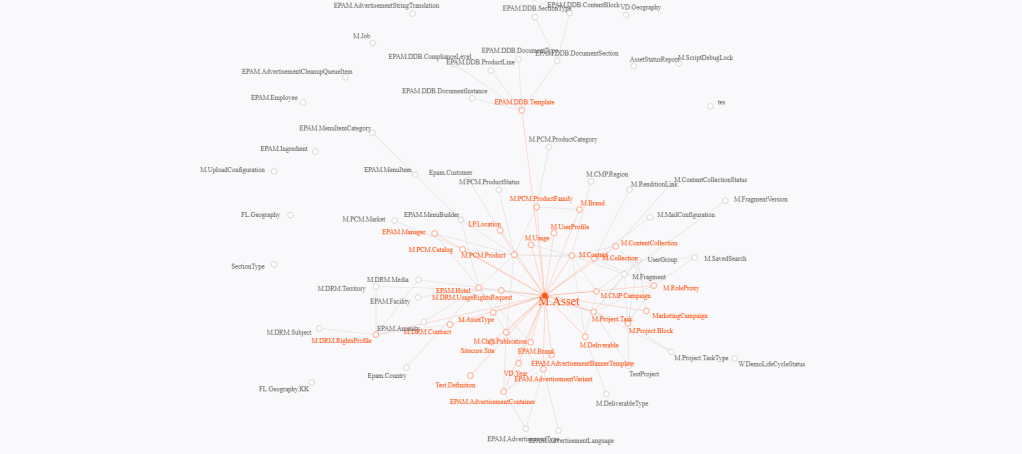
You need clarity when you’re working with complex schemas. These involve multiple entity types, relations, and cardinalities. You need something that makes the connections crystal clear.
I just finished a project I was leading on Contentful. The Contentful visualiser is quite clear on how items are related and you can toggle fields in one view.
It show relationships in a way that just makes sense. It’s the kind of tool that helps both developers and content strategists understand the bigger picture.
It does so without getting lost in technical details.
Introducing the Content Hub Entity Visualizer

I built a React-based custom component that plugs directly into Content Hub’s extensible architecture. It transforms your entity definitions into an interactive graph that actually helps you understand your content model.
Key Features
- Interactive Graph Visualisation: See all your entities and their relationships in a clean, navigable graph
- Real-time Data: Pulls directly from Content Hub’s API to show current entity definitions
- Relationship Mapping: Clearly displays relations, cardinalities, and connection types with visual arrows
- Dual View Modes: Switch between grid and network views for different perspectives
- Smart Collision Detection: Drag nodes freely with automatic collision avoidance (still being refined)
- Advanced Filtering: Search and sort entities by name or connection count
- Responsive Design: Works seamlessly within Content Hub’s interface

One big aspect though was seeing everything in one page. So when you click on a node it focuses it and the relations. Then in the right hand sidebar shows all of the info needed to understand what drives it.
Technical Architecture
The solution is built with modern React using TypeScript and integrates with Content Hub’s web client SDK. Here’s how the core functionality works:
Fetching Entity Definitions
The component uses a paginated approach to fetch all entity definitions from Content Hub’s API:
const fetchAllPages = async (): Promise<EntityDefinition[]> => {
  const allData: any[] = [];
  let page = 0;
  let hasMore = true;
  const baseUrl = window.location.origin;

  while (hasMore && page < 20) { // Safety limit
    try {
      setLoadingProgress({ current: allData.length, total: totalItems || allData.length + 25 });

      const pageParams = new URLSearchParams({
        'skip': (page * 25).toString(),
        'take': '25'
      });

      const pageUrl = `${baseUrl}/api/entitydefinitions?${pageParams.toString()}`;
      const response = await fetch(pageUrl, {
        method: 'GET',
        headers: { 'Content-Type': 'application/json' },
        credentials: 'same-origin',
      });

      if (!response.ok) break;

      const pageData = await response.json();
      const pageItems = Array.isArray(pageData) ? pageData : (pageData.items || []);

      if (pageItems.length === 0) {
        hasMore = false;
      } else {
        allData.push(...pageItems);
        if (pageItems.length < 25) hasMore = false;
      }

      page++;
      await new Promise(resolve => setTimeout(resolve, 100)); // Rate limiting

    } catch (err) {
      console.error(`Error fetching page ${page + 1}:`, err);
      break;
    }
  }

  return processEntityDefinitions(allData);
};
Processing Entity Relationships
The component intelligently processes entity definitions to extract relationships and properties:
const processEntityDefinitions = async (rawData: any[]): Promise<EntityDefinition[]> => {
  const entityDefinitions: EntityDefinition[] = [];

  for (let i = 0; i < rawData.length; i++) {
    const def = rawData[i];

    const entityDef: EntityDefinition = {
      id: def.id || i,
      name: def.name || `Definition ${def.id}`,
      is_built_in: def.is_built_in || false,
      is_taxonomy_item_definition: def.is_taxonomy_item_definition || false,
      relations: [],
      properties: [],
      description: def.description || ''
    };

    // Extract properties and relations from member_groups
    if (def.member_groups && Array.isArray(def.member_groups)) {
      def.member_groups.forEach((group: any) => {
        if (group.members && Array.isArray(group.members)) {
          group.members.forEach((member: any) => {
            if (member.type === 'Relation' && member.associated_entitydefinition) {
              // Extract target entity name from href
              const href = member.associated_entitydefinition.href;
              const urlParts = href.split('/');
              const targetName = urlParts[urlParts.length - 1];

              const relation = {
                target: targetName,
                type: `${member.role || 'unknown'}-${member.cardinality || 'unknown'}`,
                name: member.name,
                role: member.role,
                cardinality: member.cardinality,
                isTaxonomy: member.is_taxonomy_relation || false,
                isPath: member.is_path_relation || false,
                allowNavigation: member.allow_navigation || false,
                labels: member.labels || {}
              };

              entityDef.relations.push(relation);
            } else if (member.type !== 'Relation') {
              // Add non-relation members as properties
              entityDef.properties?.push({
                name: member.name,
                type: member.type,
                isMandatory: member.is_mandatory || false,
                isMultilanguage: member.is_multilanguage || false,
                isMultivalue: member.is_multivalue || false,
                is_system_owned: member.is_system_owned || false
              });
            }
          });
        }
      });
    }

    entityDefinitions.push(entityDef);
  }

  return entityDefinitions;
};
Network Visualisation with SVG
The network view uses SVG for precise control over node positioning and relationship rendering:
const GraphViewer: FC<GraphViewerProps> = ({ client, options, entity }) => {
  const [definitions, setDefinitions] = useState<EntityDefinition[]>([]);
  const [selectedEntity, setSelectedEntity] = useState<EntityDefinition | null>(null);
  const [viewMode, setViewMode] = useState<'grid' | 'network'>('network');
  const [networkTransform, setNetworkTransform] = useState({ x: 0, y: 0, scale: 1 });
  const [nodePositions, setNodePositions] = useState<Map<number, { x: number; y: number }>>(new Map());

  // Network view rendering
  return (
    <div className="network-container">
      <svg className="network-svg" width="100%" height="100%" viewBox="0 0 1200 800">
        <defs>
          {/* Arrow markers for different relationship types */}
          <marker id="arrowhead" markerWidth="10" markerHeight="7"
           refX="9" refY="3.5" orient="auto">
            <polygon points="0 0, 10 3.5, 0 7" fill="#b0bec5" />
          </marker>
          <marker id="arrowhead-reverse" markerWidth="10" markerHeight="7"
           refX="1" refY="3.5" orient="auto">
            <polygon points="10 0, 0 3.5, 10 7" fill="#b0bec5" />
          </marker>
        </defs>

        <g transform={`translate(${networkTransform.x}, ${networkTransform.y}) scale(${networkTransform.scale})`}>
          {/* Render relationship lines */}
          {filteredDefinitions.map((def: EntityDefinition) => {
            const connections = getEntityConnections(def);
            const sourcePos = getNodePosition(def, filteredDefinitions);

            return connections.map((connectedDef, index) => {
              const relation = def.relations.find(rel => rel.target === connectedDef.name);
              const targetPos = getNodePosition(connectedDef, filteredDefinitions);
              const arrows = getArrowMarkers(relation?.cardinality, false);

              return (
                <line
                  key={`${def.id}-${connectedDef.id}`}
                  x1={sourcePos.x}
                  y1={sourcePos.y}
                  x2={targetPos.x}
                  y2={targetPos.y}
                  className="connection-line"
                  stroke="#b0bec5"
                  strokeWidth="1"
                  markerEnd={arrows.end}
                  markerStart={arrows.start}
                />
              );
            });
          })}

          {/* Render entity nodes */}
          {filteredDefinitions.map((def: EntityDefinition) => {
            const position = getNodePosition(def, filteredDefinitions);
            const connections = getEntityConnections(def);
            const nodeRadius = 20 + Math.min(connections.length, 10);
            const entityColor = getEntityColor(def);

            return (
              <g key={def.id} className="network-node-group">
                <circle
                  cx={position.x}
                  cy={position.y}
                  r={nodeRadius}
                  fill="white"
                  stroke={entityColor}
                  strokeWidth={2.5}
                  onClick={() => handleEntityClick(def)}
                  style={{ cursor: 'pointer' }}
                />
                <text
                  x={position.x}
                  y={position.y + 3}
                  textAnchor="middle"
                  fill={entityColor}
                >
                  {connections.length}
                </text>
              </g>
            );
          })}
        </g>
      </svg>
    </div>
  );
};
Smart Collision Detection
One of the most challenging aspects was implementing collision detection for draggable nodes:
const resolveCollisionsOnDrop = (
  droppedPosition: { x: number; y: number },
  droppedEntityId: number
): Map<number, { x: number; y: number }> => {
  const nodeRadius = 30;
  const minDistance = nodeRadius * 2.8;
  const newPositions = new Map(nodePositions);

  // Set the dropped node's position
  newPositions.set(droppedEntityId, droppedPosition);

  // Find colliding nodes
  const collidingNodes: Array<{ id: number; pos: { x: number; y: number }; distance: number }> = [];

  for (const [otherId, otherPos] of newPositions.entries()) {
    if (otherId === droppedEntityId) continue;

    const dx = droppedPosition.x - otherPos.x;
    const dy = droppedPosition.y - otherPos.y;
    const distance = Math.sqrt(dx * dx + dy * dy);

    if (distance < minDistance) {
      collidingNodes.push({ id: otherId, pos: otherPos, distance });
    }
  }

  // Push colliding nodes away
  collidingNodes.forEach(({ id: collidingId, pos: collidingPos, distance }) => {
    const dx = collidingPos.x - droppedPosition.x;
    const dy = collidingPos.y - droppedPosition.y;

    if (distance === 0) {
      // Random direction for overlapping nodes
      const angle = Math.random() * Math.PI * 2;
      const pushDistance = minDistance + 20;
      const newPos = {
        x: droppedPosition.x + Math.cos(angle) * pushDistance,
        y: droppedPosition.y + Math.sin(angle) * pushDistance
      };
      newPositions.set(collidingId, newPos);
    } else {
      // Push away in collision direction
      const angle = Math.atan2(dy, dx);
      const pushDistance = minDistance - distance + 25;

      const newPos = {
        x: collidingPos.x + Math.cos(angle) * pushDistance,
        y: collidingPos.y + Math.sin(angle) * pushDistance
      };

      newPositions.set(collidingId, newPos);
    }
  });

  return newPositions;
};
Visual Relationship Indicators
The component uses different arrow markers to indicate relationship cardinalities:
const getArrowMarkers = (cardinality: string | undefined, isHighlighted: boolean) => {
  const highlightSuffix = isHighlighted ? '-highlight' : '';

  switch (cardinality) {
    case 'OneToOne':
      return { start: '', end: '' }; // No arrows

    case 'OneToMany':
      return { start: '', end: `url(#arrowhead${highlightSuffix})` }; // Arrow at target

    case 'ManyToOne':
      return { start: `url(#arrowhead-reverse${highlightSuffix})`, end: '' }; // Reverse arrow

    case 'ManyToMany':
      return {
        start: `url(#arrowhead-reverse${highlightSuffix})`,
        end: `url(#arrowhead${highlightSuffix})`
      }; // Arrows at both ends

    default:
      return { start: '', end: `url(#arrowhead${highlightSuffix})` };
  }
};
Why This Matters
Good tooling makes all the difference. When you can visualise your content model clearly, several things happen:
- Faster Onboarding: New team members understand the content architecture immediately
- Better Planning: Content strategists can see relationship impacts before making changes
- Reduced Errors: Visual validation helps catch relationship issues early
- Improved Communication: Stakeholders can actually understand what you’ve built
The Development Experience
Building this reinforced why I love working with modern React tooling. The component architecture makes it easy to extend – want to add filtering? New node types? Custom styling? The modular approach means you can iterate quickly without breaking existing functionality.
The integration with Content Hub’s SDK is straightforward, and the fact that it pulls live data means you’re always working with current information. No more outdated documentation or manual diagram maintenance.
What’s Next
This is just the foundation. I’m considering adding features like:
- Export functionality for documentation
- Advanced Search and filtering capabilities (basic already implemented!)
- Custom entity grouping and categorisation
- Integration with Content Hub’s workflow system
- Historical relationship tracking
The beauty of building your own tools is that you can evolve them based on real usage patterns.
Try It Yourself
The complete source code is available on GitHub at timmarsh1987/CHVisualiser. It’s designed to be easily deployable in any Content Hub environment.
If you’re working with Content Hub and finding the native visualisation lacking, give this a try. And if you build something cool on top of it, I’d love to hear about it.
Sometimes the best way forward is to build exactly what you need – this visualiser has already made my Content Hub work more productive and enjoyable. Hope it does the same for you.


 Tim's Blog
Leave a Reply