


Sitecore Content Publisher allows users to build publications directly into Sitecore Content Hub. This can massively reduce time to market for publications as users can directly use approved assets from the Content Hub DAM.
Brief introduction to Media Processing
Content Hub has a really powerful ‘Media Processing‘ capability to create new asset renditions. These can be configured to automatically run depending on the file type being processed.

It offers a point and click flow editor that offers users a clear mechanism for building rendition flows.

The Challenge
I am currently the architect on a Content Hub solution for a global brand which required us to to extend the functionality of Sitecore Content Publisher. When previewing publications back to users we noticed only the first page was shown when previewing.
The Solution
We started looking into the issue and wanted to check the renditions flows that are triggered. Checking each type under the ‘Chili’ set, its actually the xml file type as this is what is used for previews.

After opening this item you need to click on the preview step and in the parameters see the Multi-page option in unchecked (In the image below this is after the change).
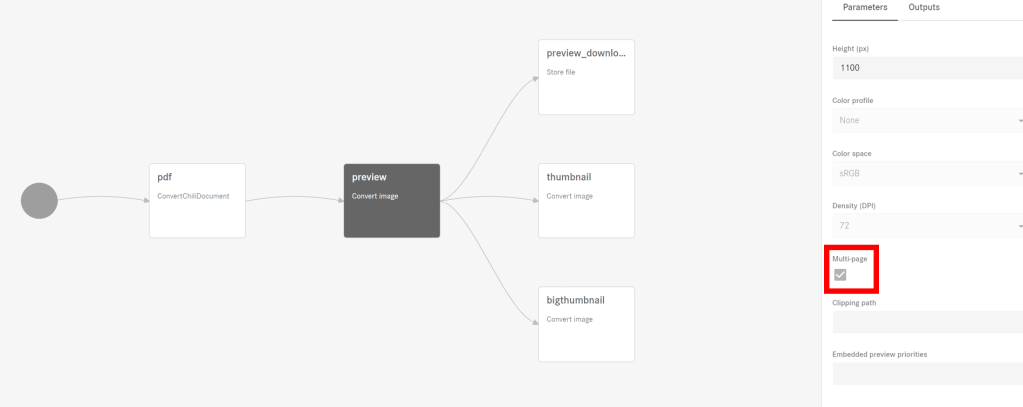

However, something is missing!
We don’t have rights to edit the rendition flow and need Sitecore Support to change the option.
Next step is to create a support ticket on Sitecore Support requesting that the locked rendition is updated to allow multi page. Soon as they have made the change create a new publication or save an existing to trigger the change. This will now show PDFs as multipage in the previews in Content Hub.
You will need Sitecore support to apply this change to all of your environments.
I hope this helps out anyone that wants to preview multi-page publications in Content Hub
Happy coding!


 Tim's Blog
Leave a Reply