


I always love it when I’m pleasantly surprised and discover something I think is really interesting.
This happened yesterday when I was working on a request. The request was for annotating assets in Content Hub. I knew you could comment on assets but wasn’t sure on annotations. I remember reading a page about it in the Content Hub docs but never tried it.
I had a call with Sitecore and I mentioned to Chris G the Director of Solution Engineering that it would be a great feature to have. To my absolute amazement Chris informs me it’s all out of the box. After saying ‘no way’ I proceeded to fire up my sandbox and check it out.

It works really well and it’s one of them features I feel could be so valuable for users.
Content Hub has so many amazing features and gives the user so much power. This is one of them cases for me where Content Hub has so many features. As an admin you might think it’s lacking something which is already there in the product.
Here are the steps to perform annotations in Content Hub.
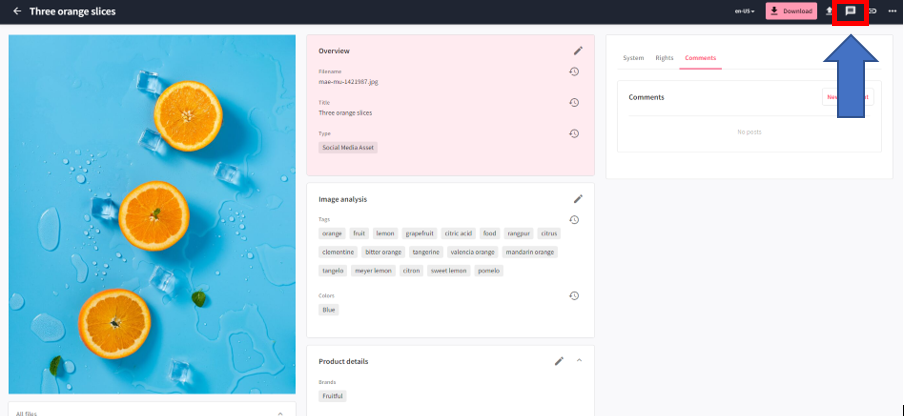
Firstly navigate to an asset detail page and on the right hand side you will see the symbol shown below. Click this to open the annotation functionality.
The user will be presented with the following view – I have marked up the available options


The annotation functionality offers users quite a few different options and shown on here is an expansion of the shape option
Not only can you choose the shape, also the colour, thickness, opacity and style.
After finding the right annotation tool they want to use. Users can directly make comments and visual marks directly within Content Hub.
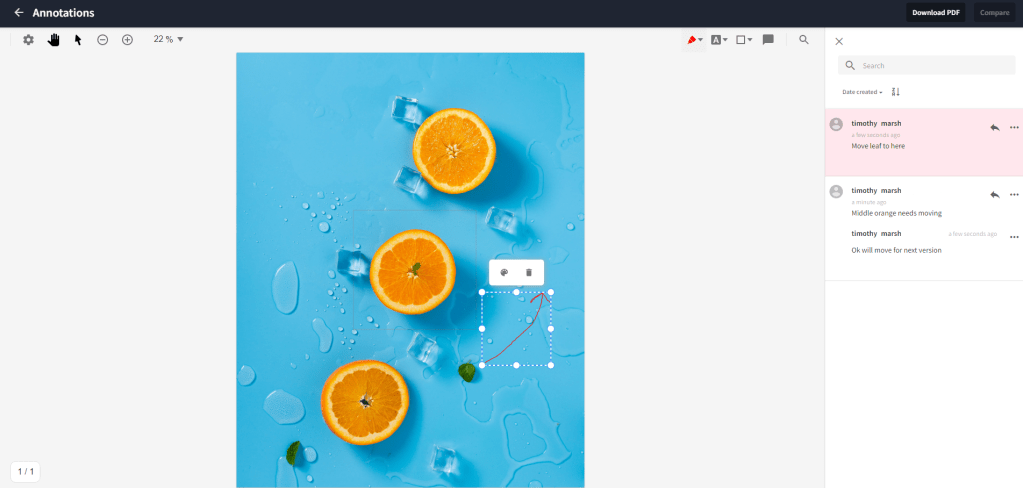
As you can see above users can add annotations directly into the screen and whatever shape/tool they use will activate a model for comments. After they are saved they appear in the right hand side.
Users can then reply to comments directly in the view allowing multiple edits to be made. Additionally clicking on a comment will select the annotation on the image
When finished the user can choose to download a PDF of the annotation’s. Below is the download for the one shown here.
Its not only images that can be annotated, documents and videos can also have annotations made. Annotations in videos are added to the video timeline with a little flag. The user then makes a comment and these are shown in the right hand side.

Hopefully this is a hidden feature that other users will also find interesting.


 Tim's Blog

Leave a Reply